
Will this replace my tools?
No. Keep Nmap, Burp, BloodHound, NetExec, and the rest. AttackCompass sits above them and connects the engagement.
Product
Follow one engagement through AttackCompass — record what you find, see what deserves attention next, keep the route clear, and build the report from work you already saved.
You choose and run every action. AttackCompass keeps the engagement coherent.
Workflow cards
Browse technique steps by phase. Each card is operator-controlled — you choose what to run, and AttackCompass keeps the method and context attached to the engagement.
Inside a card
Open a card and work it like an operator. You get the method, copyable commands for the active target, what success looks like, and what to try if it fails.
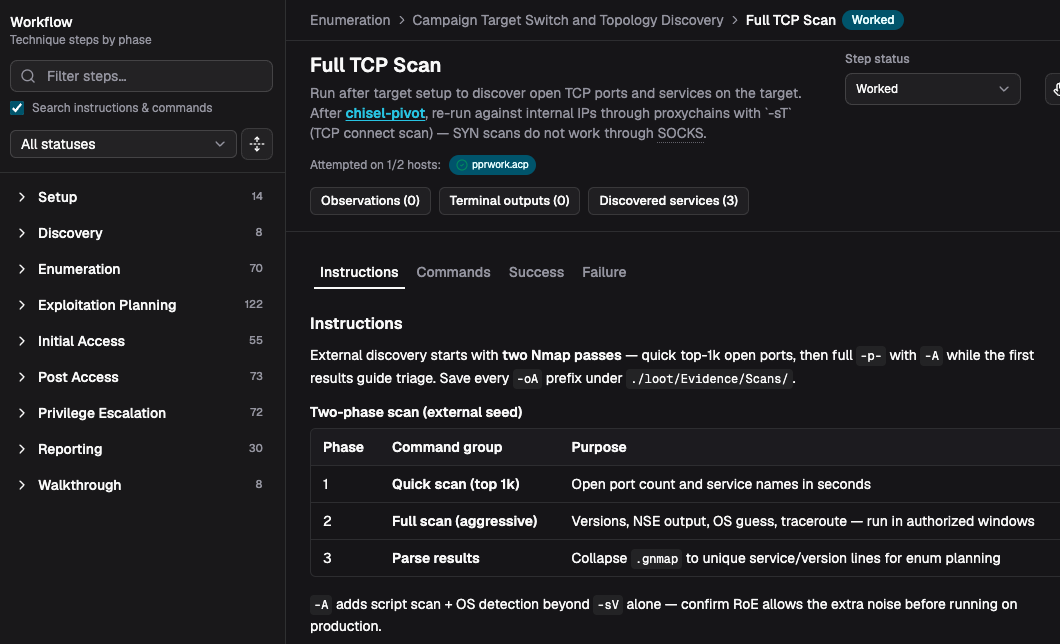
Instructions
Methodology for the step — what to do, where to save evidence, and RoE notes before you run anything noisy.
Operator controlled. No autonomous exploitation. Commands stay in your terminal.
Active route
Real engagements branch. AttackCompass records the active route so pivots stay readable while recommendations stay scoped to where you are.
Operator-controlled. No autonomous exploitation.
From
Kali
Operator position
Via
WEB01
Current pivot
Target
DC01
Active focus
Recommendations
Steps are ranked from engagement evidence — not open-ended model improvisation. The important part: AttackCompass tells you why.
Example
Recommended because TCP/445 is reachable and a validated credential is available for this host.
Stronger than mysterious AI magic — you can judge whether the step fits.
Fit
AttackCompass is not another tool you run. It is the system that keeps the engagement coherent from discovery to report.
No. Keep Nmap, Burp, BloodHound, NetExec, and the rest. AttackCompass sits above them and connects the engagement.
Yes. You choose every action. Recommendations adapt to what you saved — they do not force a fixed checklist.
Start from web, network, Active Directory, or custom. Record what you find and the next-step ranking follows that state.
Capture has a cost. The payoff is not reconstructing the engagement when it is time to report — and not losing the why behind each next step.
Guided engagement
The same loop you run on a real authorized pentest — kept in one workspace.
Start a workspace for the authorized test. Choose the engagement shape that matches the work — web, external, internal, Active Directory, or custom.
Add hosts, services, credentials, and findings as you test. Keep using Nmap, Burp, BloodHound, and the rest — in Lab mode you can also import Nmap or OpenVAS XML.
Open a workflow card for instructions, copyable commands, success checks, and failure fallbacks. You choose and run every action.
Keep From / Via / Target clear so pivots stay readable as the engagement branches.
Save notes, screenshots, and proof while you work so the report is not rebuilt from memory later.
Pull saved findings into the report editor, review with diffs and CVSS, then export PDF or Markdown.
Reporting
When testing stops, the engagement is already in the report editor — cover, findings, evidence, and review tools — ready to polish and export.
7-Day Full Trial
Full access for seven days. No billing details required to start. Discover → prioritize → capture evidence → generate report.
Read the Security Model